
In the previous log #1, I implemented the simplest possible agent. This time, I’m going a bit further by adding various kinds of information to State beyond just messages and making use of the system prompt.
Table of contents
Open Table of contents
- 1. Revisiting the routing function
- 2. Adding non-message information to State
- 3. Dynamically building the system prompt from State information
- 4. Building a chatbot — continuing the conversation
- 5. The truth behind “AI remembers” — it’s accumulated messages, not a tool
- Retrospective — the importance of design skill
- What’s next
- Further study topics
1. Revisiting the routing function
I took another look at the routing function, something I hadn’t paid much attention to in the previous implementation.
add_conditional_edgescreates a branch- The flow goes to the node whose name matches the string the routing function returns
- That mapping is given as a dict argument to
add_conditional_edges
2. Adding non-message information to State
I made AgentState manage more than just messages — it now also tracks:
- The user’s name
- The tool call count
- The session start time
- Other miscellaneous context
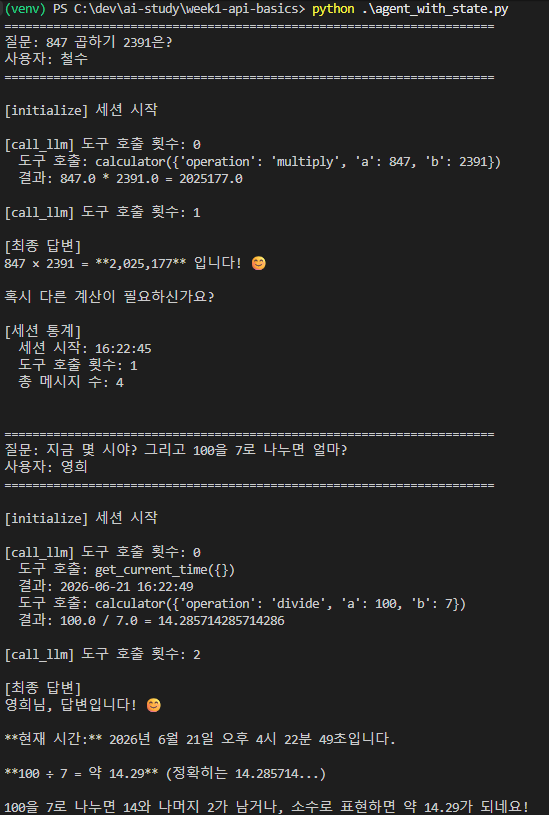
Looking at the output, State now shows not just which messages were received, but also:
- Who the current user is
- How many times a tool has been called
- When the session started
I used this pre-populated State information in generating the response as well.
3. Dynamically building the system prompt from State information
When I inserted State information into the system prompt, the responses followed the rules much more consistently. This is called dynamically constructing the system prompt using State.
This pattern is what makes it possible for the same graph to produce responses with different context per user — for example, “Park Hyoin, you’ve used a tool 3 times” for user A, versus “Minsu, this is your first time” for user B.
Applying this to a study-notes LangGraph
I applied this idea to build a LangGraph for study notes. In State, I tracked things like:
- The current streak of consecutive study days
- What stage the current user has reached in their studies
and fed that into the system prompt. The result:
It handled things a generic LLM wouldn’t have been able to answer quite appropriately.
The environment I ran this in is just one case, but since each user would supply their own State when multiple users use the system, this same structure should work as-is.
4. Building a chatbot — continuing the conversation
Previously, the pattern was one function call, one response. This time, I implemented a chatbot so that the conversation continues.
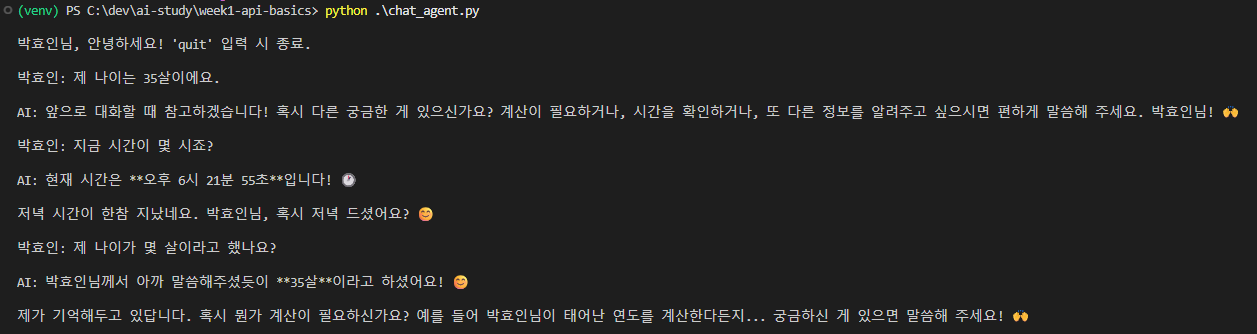
What struck me as odd: among the tools I implemented as functions, one just said “remember this” with no actual logic — yet it somehow remembered my age. My first reaction was, “How did it know that?“
5. The truth behind “AI remembers” — it’s accumulated messages, not a tool
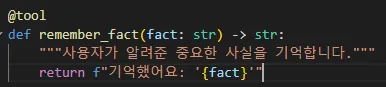
It turned out the tool above never actually did anything. It was simply remembering because whatever I’d said earlier was still sitting in the message history. Since the LLM receives the entire conversation history as context on every call, it looks like it’s “remembering” even without any separate memory mechanism.
So what would real memory look like?
To build actual persistent memory, you’d need one of:
- Saving to a JSON file (simple persistence)
- Adding a dedicated storage slot in State (accumulated within the graph)
- Saving to a vector DB (enables semantic search — the pattern from my RAG post)
Since conversation history is bounded by the context window, one of these approaches eventually becomes necessary for long conversations.
This realization was the core takeaway of the day. The phrase “AI remembers” actually conflates two different things — short-term (accumulated messages) versus long-term (external storage).
Retrospective — the importance of design skill
Building this reminded me once again how much design matters. Even with a great tool like this, you first have to:
- Decide what you’re going to use it for
- Judge whether it’s actually applicable given the current situation
- Decide how you’re going to use it
Only then can you even start implementing. You need the skill to sense sharply what functionality is needed and what pain point it’s solving.
The strength of a tool like LangGraph is its modularity (State + nodes + edges + branching), but how to map that modularity onto a given scenario is ultimately up to the person (or the AI you’re pair programming with).
What’s next
- Actually implementing persistent memory (via JSON, State accumulation, or a vector DB)
- Simulating a multi-user environment — separating State per session
- Working with LangGraph’s
add_messagesreducer andMessagesState
Further study topics
1. The Memory module in LangChain / LangGraph
ConversationBufferMemory(full history) vsConversationSummaryMemory(accumulated summary)VectorStoreRetrieverMemory— semantic recall based on a vector DB- LangGraph’s own checkpointer and thread-level persistence
- Designing the boundary between short-term (context window) and long-term (external storage)
2. State persistence — Postgres / Redis / Checkpointer
- LangGraph’s
MemorySaver,PostgresSaver,RedisSaver - Structures that let conversations continue even after a server restart
- The pattern of separating sessions by thread_id for multiple users
3. Patterns for dynamically constructing system prompts
- State → system prompt (what I worked with this time)
-
- Dynamically picking few-shot examples from State as well
-
- Choosing tools based on State too (e.g., whether to expose admin tools depending on the user’s role)
4. MessagesState + the add_messages reducer
- I’ll cover this in the next log
- How multiple nodes adding messages simultaneously get accumulated without conflicts
- How this differs from a plain dict
5. Sorting out “memory” terminology — there’s a lot of it, and it’s confusing
- Short-term memory (= context window)
- Long-term memory (= external storage)
- Episodic memory (recalling specific events) vs Semantic memory (accumulated facts)
- Working memory (information currently being worked on)
- These terms in AI are borrowed from cognitive science, and they get mixed up a lot in LangGraph’s documentation