
Yesterday I worked with the parts of RAG (embedding / cosine similarity / chunks). Today I integrated those parts into a system. Here’s the order:
- Introduce a vector DB (Chroma)
- Use my study notes (blog posts) as the corpus
- Split into chunks + build an index
- Combine with an LLM to build a Q&A system
It doesn’t quite click just from reading about it. I got a feel for it by actually implementing it.
Table of contents
Open Table of contents
1. Introducing Chroma — a vector DB instead of numpy
Yesterday I did embedding and search directly with numpy. In practice, you use a vector DB. Reasons:
- Search speed — ANN search via indexing algorithms (like HNSW)
- Persistence — embeddings you’ve already computed get saved to disk
- Metadata management — chunks can carry source, creation date, tags, etc. alongside them
Chroma is the easiest open-source option to get started with. One line, pip install chromadb, and you’re done.
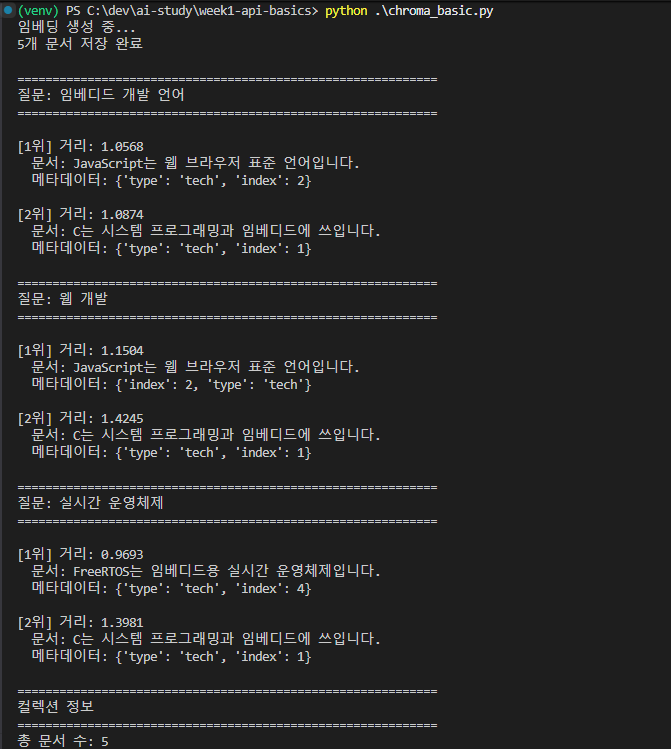
What stood out was that the values differ from the cosine similarity I saw yesterday. Chroma’s default is L2 distance — closer to 0 means more similar, closer to 2 means more different (with cosine, 1 is similar, -1 is opposite).
Looking at the results:
- The answer to the first question was wrong, and the gap between rank 1 and 2 scores was small → a signal to be suspicious of retrieval quality
- When it answered correctly, the gap between rank 1 and 2 scores was clear
Since it’s a PersistentClient, I don’t need to regenerate embeddings I’ve already made. That’s why re-running finishes quickly.
2. Using blog posts as the corpus — glob
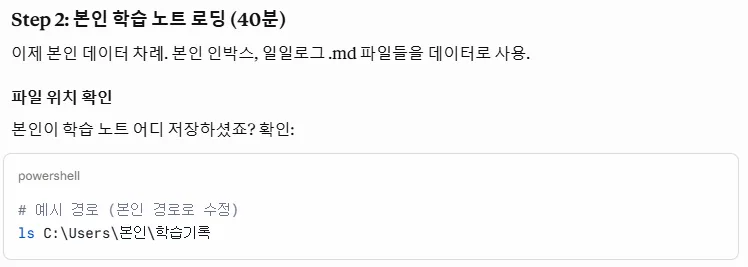
I hadn’t kept a separate record of my study log. I figured I could use my blog posts as the data. One line with glob.glob loaded all the .md files.
3. Splitting into chunks — from re to frontmatter
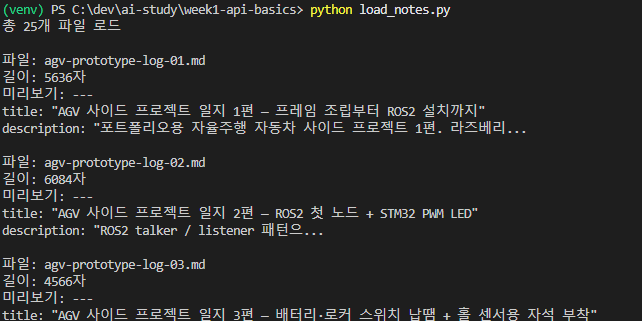
The next step was to split the notes into chunks.
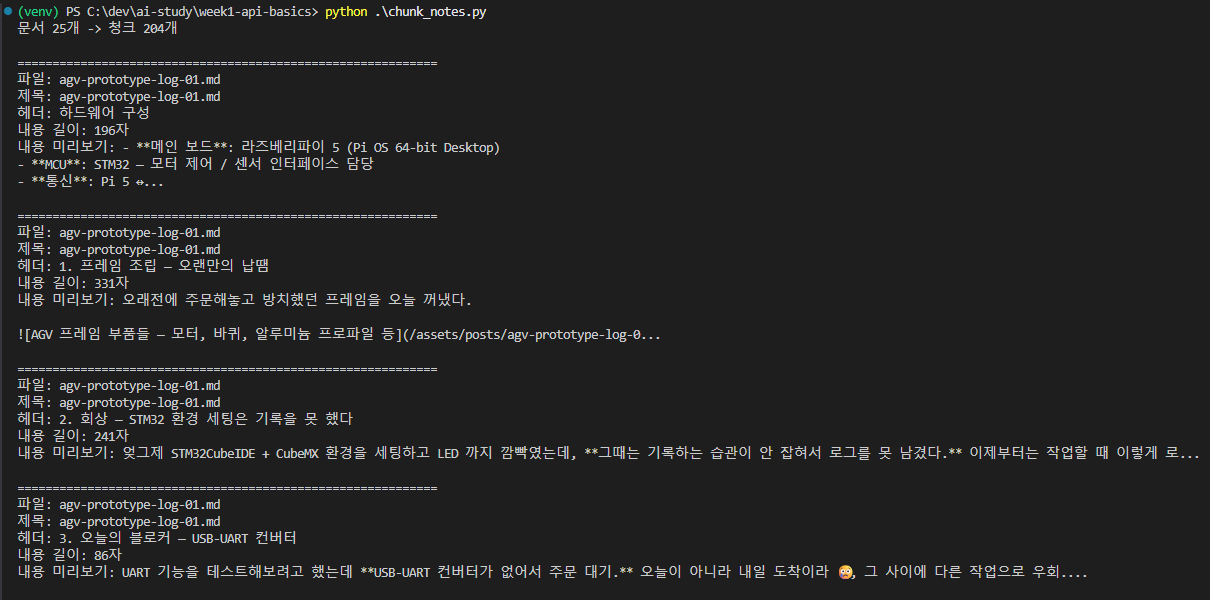
At first I thought it worked, but looking at the code, the re-based regex parsing was built for the study log format. My blog posts have a different structure (frontmatter + markdown). So I redid the parsing to fit blog posts.
Code: chunk_blog_posts.py
Instead of re, I used the frontmatter library. It cleanly separates a markdown post’s metadata (title, tags, pubDatetime) from its body content.
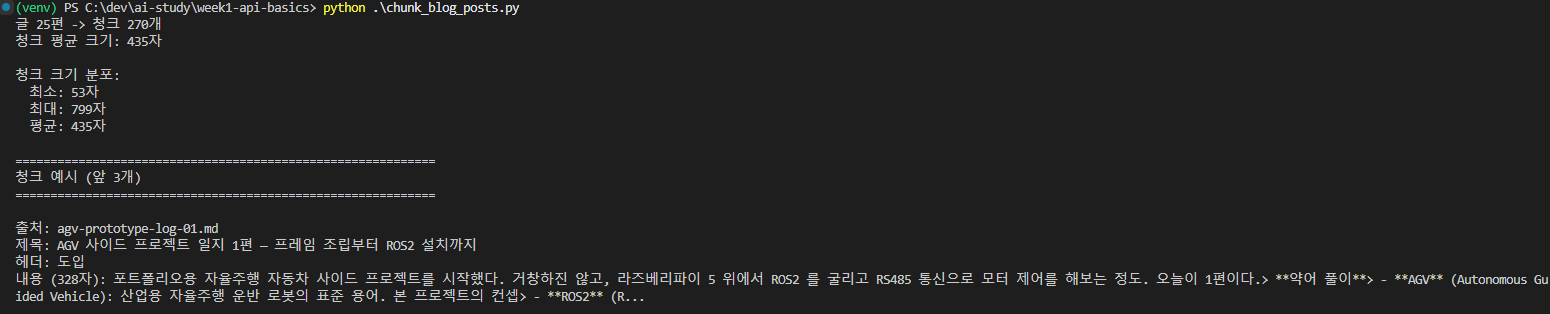
The filename / title / header / content became bundled into a single chunk. I still need to separately check whether the chunks are split along meaningful boundaries (for now it’s based purely on size).
4. Building the index — embedding 270 chunks
Code: build_blog_index.py
I came across the phrase “building an index,” which seems similar to embedding. (In practice it’s a term that bundles together generating embeddings, loading them into the vector DB, and constructing the search index.)
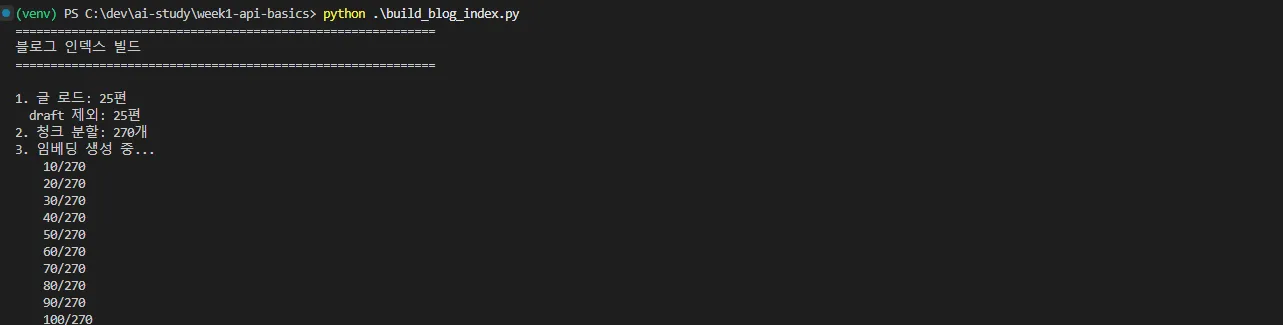
270 chunks generated in about a minute. Now I could use this for the Q&A system.
5. The Q&A system — OpenAI embeddings + Claude answers
Code: blog_qa.py
A combination of everything I’d learned so far:
- OpenAI API — embeddings (
text-embedding-3-small) - Claude API — answer generation
- Chroma — vector search
- System prompt — “Answer only using the given context. If you don’t know, say you don’t know.”
I tested it with three questions.
Question 1 — “What’s the core idea behind RAG?”
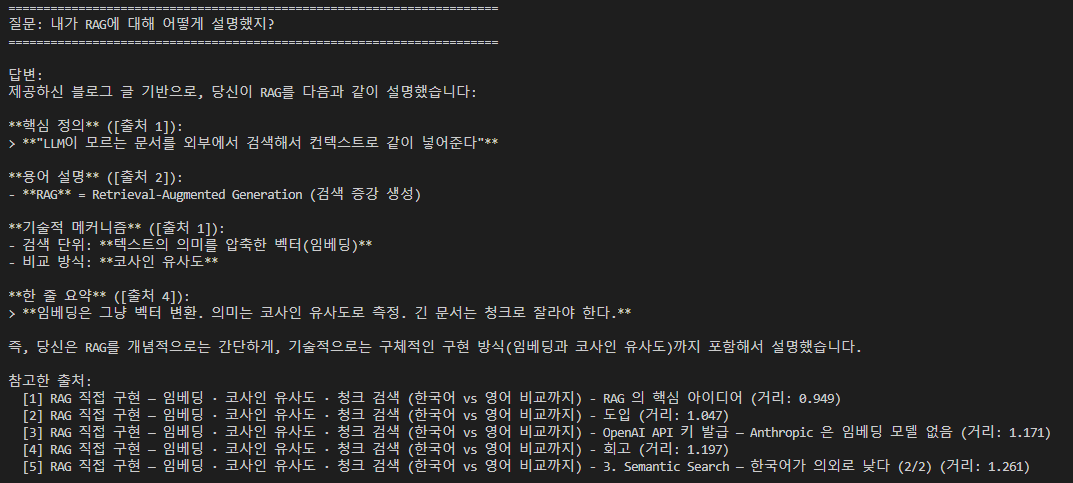
It pulled correctly from the post I recently wrote on basic RAG concepts. It retrieved from the right chunk, with a high similarity score and a satisfying result.
Question 2 — “What did you struggle with while learning Tool Use?”
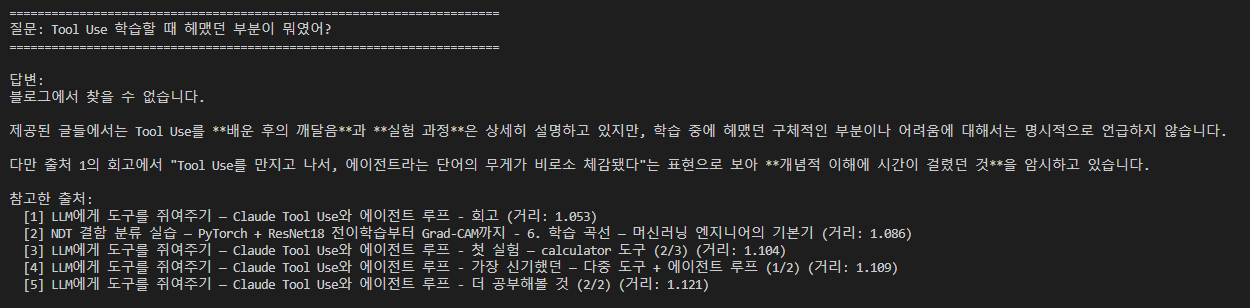
This one genuinely surprised me. When I actually wrote the Tool Use post, I didn’t run into any errors or difficulties, so while I wrote a retrospective, I never wrote about struggling. Naturally, that content doesn’t exist in the blog post either, and RAG detected that and answered, “I couldn’t find this in the blog.”
Answering “I don’t know” when you truly don’t know is the most important capability of a RAG system (not hallucinating an answer that doesn’t exist).
Question 3 — “Why did you switch from embedded to AI Agent development?”

My current domain isn’t fixed — I’m interested in both, so I’ve never said I “switched.” Naturally, no such post exists either. RAG:
- Confirmed “there is an embedded background” ✓
- Also figured out that “there’s no mention of switching toward AI agents” ✓
That said, the distance value was somewhat high, which is a signal that retrieval quality might not be great. So I decided to try again after shrinking the chunk size.
Retrospective
Two things stood out most this time:
① Learning through examples sinks in better than learning through terminology
The terminology-plus-playground approach (UI / DB / API) is fine too, but learning through examples like this makes things click much better and makes me want to apply what I learned. It’s a good learning method.
② An idea for attaching RAG to another product
While learning RAG this time, I thought — what if I attached it to OneSmallThing (a small-achievement tracking service for perfectionists that I’m currently dogfooding)? I could use a user’s journal entries as the RAG corpus, and it might help track and analyze patterns of negative feedback or self-deprecation about one’s own achievements.
③ Building a personal LLM
Cloud APIs like Claude / OpenAI could become more expensive per token down the line, or usage could be restricted in Korea. Building a personal LLM (a local model + my own RAG) also sounds like a fun project.
Things to study further
1. Vector DBs beyond Chroma
- pgvector (Postgres + extension) — natively supported by Supabase, integrates with an existing DB
- Pinecone / Weaviate / Qdrant — dedicated hosting options
- FAISS (Facebook) — a library, the fastest option
- Selection criteria: data volume / hosting / whether metadata queries are needed
2. Distance metrics — L2 vs Cosine vs Inner Product
- L2 (Euclidean) — Chroma’s default. The straight-line distance between two vectors. Closer to 0 is more similar, larger means farther apart
- Cosine — what I looked at yesterday. Angle-based. Closer to 1 is similar, -1 is opposite
- Inner Product (Dot Product) — identical to cosine for normalized vectors
- Which metric fits depends on how the embedding model was trained (text-embedding-3 recommends cosine)
3. Tuning chunk size / overlap
- Something I flagged in my author notes — Q3’s retrieval quality was low, so I plan to try shrinking the chunk size
- Recursive Character Splitter (the LangChain standard) vs Semantic Chunking
- Overlap (sliding window) preserves context that would otherwise get cut off at chunk boundaries
- Methods for measuring retrieval quality (like recall@k) across combinations of chunk size and overlap
4. Introducing Hybrid Search
- Vector search alone doesn’t handle proper nouns, exact code, or typos well
- Combining BM25 (traditional keyword search) with vector search
- Merging the two result rankings with Reciprocal Rank Fusion (RRF)
- Chroma itself is vector-only; if you need hybrid search, consider Weaviate / Qdrant
5. Personal LLM — a local RAG stack
- Ollama (easiest entry point) — run Llama 3 / Mistral / Qwen etc. with one line
- llama.cpp + gguf models — quantization lets them run on 4–8GB of RAM
- Embeddings can also be local (like
nomic-embed-text) → a fully offline RAG - Answer quality is a notch below cloud LLMs, but there’s a cost / censorship / privacy trade-off