
At the end of my study method post, I noted down LangChain, Hermes agent, and local LLM as candidates for my next study topic. I was planning to look at LangChain first, but while searching around, LangGraph kept coming up alongside it. Turns out it’s a framework made by the same company (LangChain Inc).
Apparently most companies use both:
- LangChain — for preparing components like retrievers, tools, and memory
- LangGraph — for wiring those components together into an agent flow
Today’s post is my first LangGraph log.
Table of contents
Open Table of contents
Installing it and my first import
I’ve seen it described as “a tool for wiring up an agent’s nervous system,” but I had no idea what that meant at first. My rough understanding going in: you build a graph out of nodes and edges, compile it, and the agent runs according to that design. That was enough to get started.
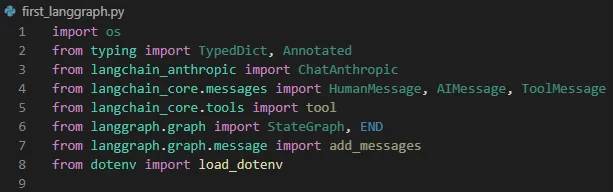
Once I started implementing it, I noticed there are a lot of imports. Looks like there’s a lot to learn here. At the same time, it made me wonder, “how does a graph like this actually run?” I figure I’ll learn that as I go.
My first graph — nodes, edges, branches, and loops
Since this was my first time working with it, there were a lot of unfamiliar terms.
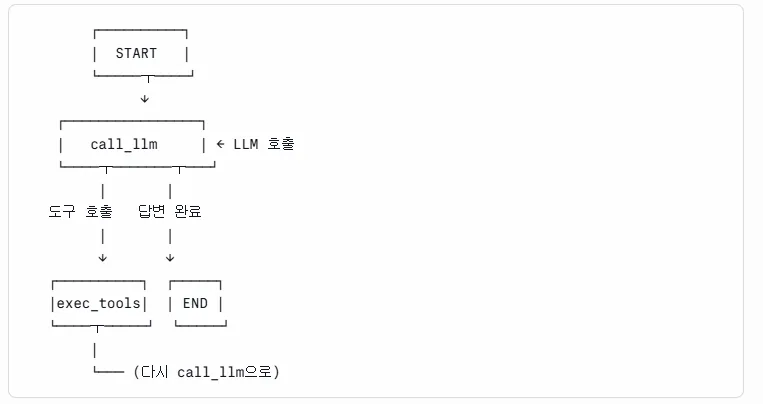
I implemented it following the diagram above. Here’s what I understood:
- Start by creating a
StateGraph - Attach function nodes (
add_node) - Connect nodes with edges (
add_edge) - Handle branching with
add_conditional_edges - For a loop, connect an edge from a later node back to an earlier one
Building the tool was similar to what I did in my Tool Use post.
Execution result
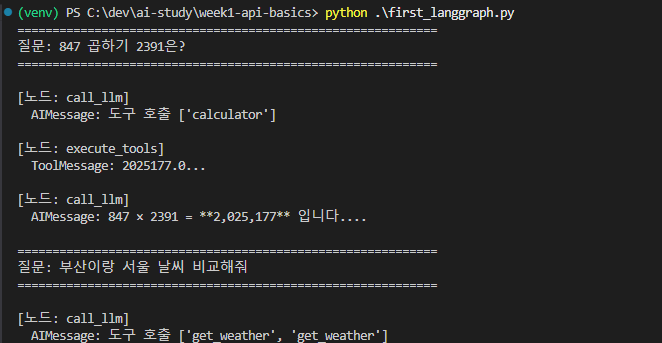
Roughly how it worked:
- Calculation or weather questions → the registered Tool figures out the value, then answers
- Everything else → passed straight to the
call_llmnode for an answer
Why State confused me — a game character analogy
One thing that was a bit puzzling was State. I read explanations describing it as “the data an agent keeps carrying as it progresses,” but that didn’t quite click, so I ran a few more examples to figure it out.
In the end, it was simpler than I thought — it’s really just “state” in the plain sense. State represents where the agent currently is in the process of moving through the graph.
I was also confused by the term agent, which came up alongside this. The widely accepted definition is roughly:
“An LLM-based system that judges and acts on its own.”
Putting these together, here’s the analogy I landed on:
When you call
run, a character is created. That character follows a pre-drawn graph to carry out tasks. State is what represents that character’s current condition — its inventory, its HP.
Translating that back to LangGraph — State is what messages the agent is holding, and what values it’s carrying.
Once I settled on this analogy, reading the code made a lot more sense.
What’s next
- Dig deeper into how LangGraph works internally (what
compileactually does) - Combine LangChain’s tools and memory with LangGraph’s flow
- Try examples that define State in more complex ways (TypedDict, Reducer, etc.)
Things to study further
1. LangGraph’s compilation — what does compile() actually do
- What form does it convert the graph into (an executable function? a state machine?)
- How do node/edge definitions get turned into a runtime execution flow
- How does debugging/visualization work (LangSmith integration?)
2. LangChain vs LangGraph — the exact division of roles
- Why does the same company maintain two separate frameworks
- LangChain’s
Chain(LCEL) vs LangGraph’s graph — when to use which - Patterns for using both together in real-world cases (retriever/tool/memory + flow)
3. Advanced State patterns — Reducer / Channels
- Defining types with TypedDict instead of a plain
dict - Accumulating state across nodes with a Reducer (e.g., appending to a message list)
- Controlling data flow between nodes with Channels
- Handling conflicts when multiple nodes modify State at the same time
4. The general definition and classification of agents
- “Judges and acts on its own” — where’s the line for what counts as an agent
- Patterns like ReAct (Reason + Act), Plan-and-Execute, Reflexion
- The boundary between simple Tool Use and an agent
5. Multi-agent / Human-in-the-loop in LangGraph
- Graphs where multiple agents collaborate
- Nodes where a human can step in (approval / edits)
- Real production scenarios (customer support, code review, automated document writing, etc.)