
Starting MCP study today.
MCP = Model Context Protocol — I didn’t know this, but it turns out to be a standard protocol created by Anthropic (of course, the GOAT of the LLM world). It’s a standardization of how LLMs access external systems (files, DBs, APIs, etc.).
Table of contents
Open Table of contents
- Why MCP Is Needed — The Limits of Tool Use
- The 3 Components of MCP
- Communication Methods — stdio vs HTTP/SSE
- Installing the MCP SDK
- My First MCP Server —
say_hello+add_numbers - Testing with MCP Inspector
- Second Example — Energy Management MCP Server
- Retrospective — MCP as a “Detached Tool”
- What to Study Next
Why MCP Is Needed — The Limits of Tool Use
Tool Use, which I covered before, already lets LLMs interact with the outside world. But there’s a problem: as the number of tools grows, the code gets complicated.
MCP solves this by separating tools into a dedicated server. This gives you:
- Separation of tool development and LLM app development
- The ability to reuse a tool server across multiple LLM apps once built
- Standardization — clients other than Anthropic’s can use the same server
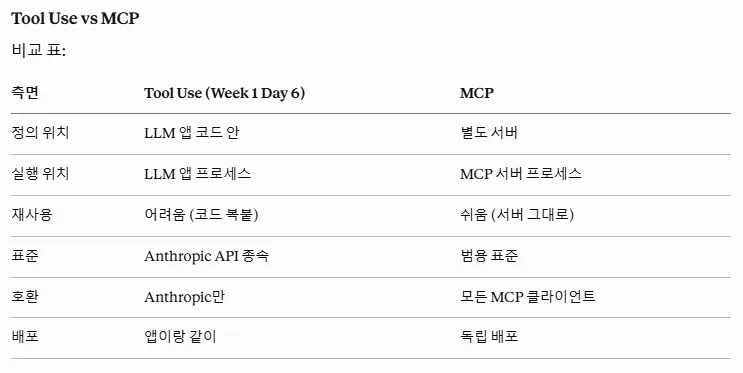
| Aspect | Tool Use | MCP |
|---|---|---|
| Where defined | Inside the LLM app code | Separate server |
| Where executed | LLM app process | MCP server process |
| Reusability | Hard (copy-paste code) | Easy (reuse the server) |
| Standard | Tied to Anthropic’s API | Universal standard |
| Compatibility | Anthropic only | Any MCP client |
| Deployment | Bundled with the app | Independent deployment |
When to Use Which
- Tool Use — for simple tools used only within your own app
- MCP — for tools that need to be reused across multiple places or need standardization
The 3 Components of MCP
| Component | Definition |
|---|---|
| Tools | Functions the LLM calls |
| Resources | Data the LLM can read |
| Prompts | Predefined prompt templates |
Today I’ll focus mainly on Tools.
Communication Methods — stdio vs HTTP/SSE
| Method | Description | Difficulty |
|---|---|---|
| stdio | Standard input/output (communication between local processes) | Simple to implement |
| HTTP/SSE | Remote server over a network | Complex to implement |
Today I’ll do the example using stdio. It’s enough for a local demo.
Installing the MCP SDK
The MCP SDK is available for Python and TypeScript. I’ll go with Python.
pip install mcpMy First MCP Server — say_hello + add_numbers
Code: first_mcp_server.py
This is the part where you really feel that MCP is used in place of Tool Use — you use the annotation @mcp.tool().
from mcp.server.fastmcp import FastMCP

mcp = FastMCP("first-mcp-server")

@mcp.tool()
def add_numbers(a: int, b: int) -> int:
    """두 숫자를 더합니다.

    Args:
        a: 첫 번째 숫자
        b: 두 번째 숫자

    Returns:
        두 숫자의 합
    """
    return a + b
Two Key Points
- The Args / Returns format in the docstring — this is what describes the function to the LLM. The format matters.
- Type hints on parameters (
a: int) — these automatically generate the input schema.
Just by writing a single type hint, MCP automatically builds a JSON schema and exposes it to the LLM. Clean.
Running the Server — No Output
When you run the server, it just sits there with no output.
python first_mcp_server.pyBecause it’s the stdio approach, the server just waits until an MCP client calls it. It’s normal for nothing to appear on screen.
Testing with MCP Inspector
To check whether the server is up and whether Tools are properly exposed, MCP Inspector is the standard tool:
npx @modelcontextprotocol/inspector python first_mcp_server.py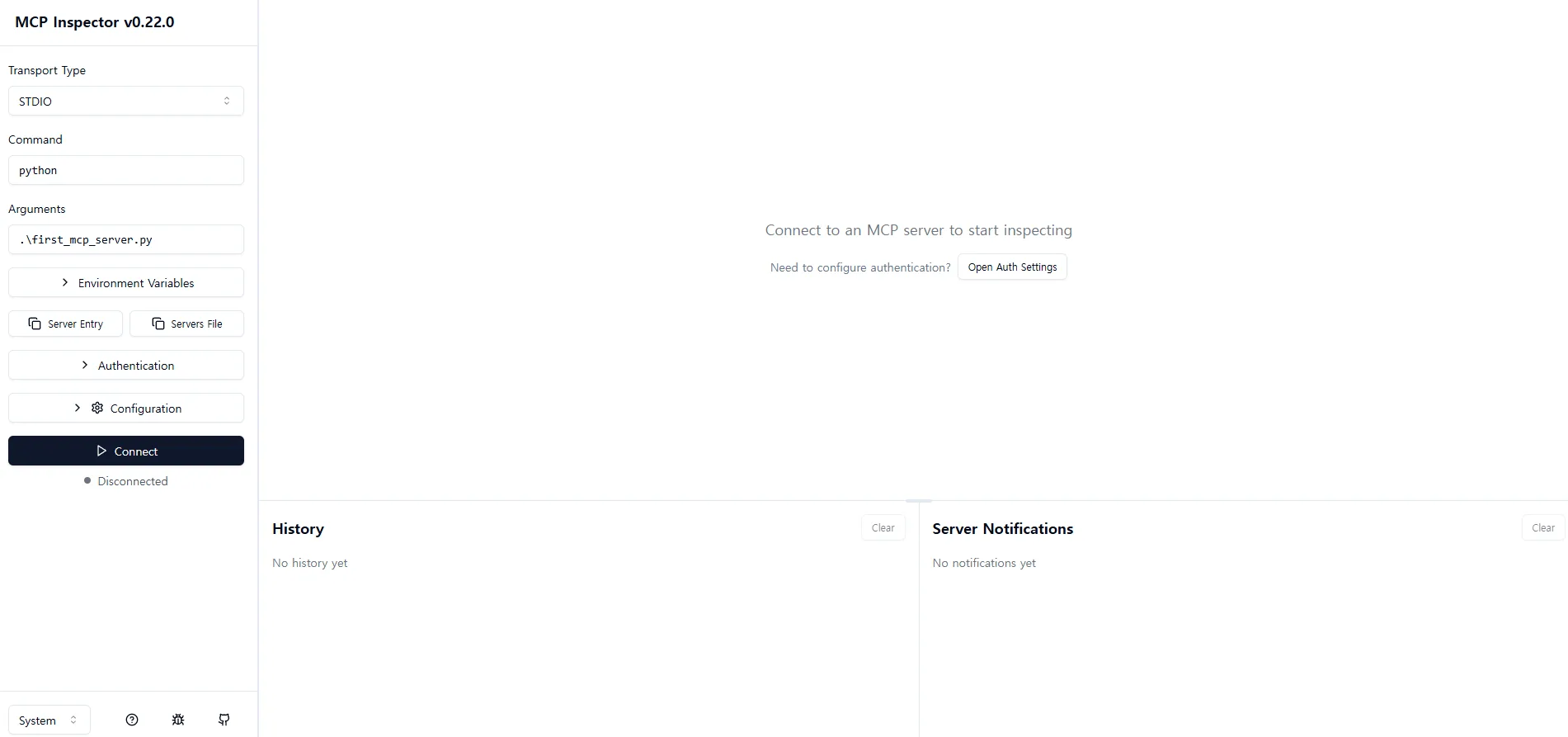
What you can check in Inspector:
- Server connection info
- The list of exposed Tools / Resources / Prompts
- Actual calls + results
Troubleshooting — Connection Failed
At first, clicking the Connect button didn’t establish a connection.
Cause: the path to python.exe in Command was wrong. It needs to point to the venv’s python, not the python on the system PATH.
→ After specifying the path to python.exe inside the venv, the connection succeeded.
Connection Succeeded — Tools Confirmed as Exposed
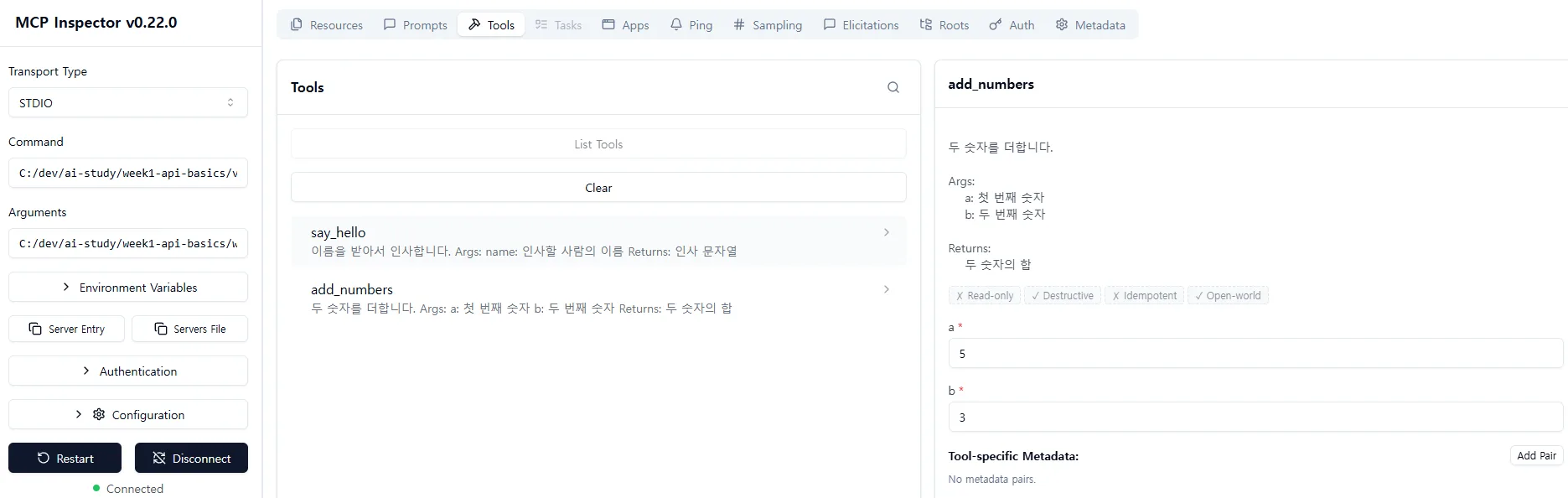
Two tools, say_hello and add_numbers, are exposed on the left. The Args/Returns from the docstring are laid out as-is in the right panel.
add_numbers(a=5, b=3)→ result8✅
say_hello Call Result
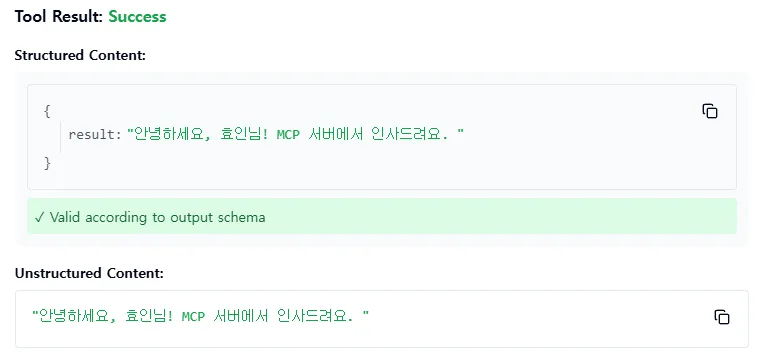
If you provide a name, it returns a greeting string. There’s a note saying Valid according to output schema — this shows that MCP also validates the output schema.
Second Example — Energy Management MCP Server
I built an energy management MCP server using fake data. It naturally ties into the scenario from the FEMS project.
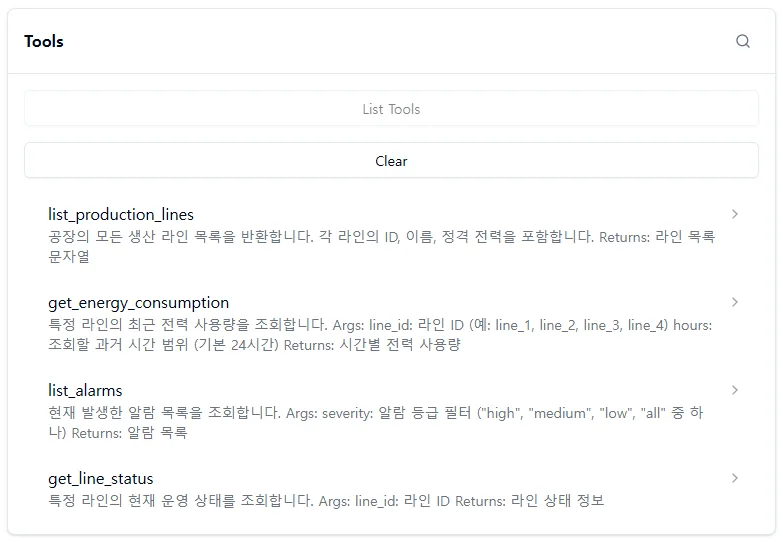
4 tools:
| Tool | Purpose |
|---|---|
list_production_lines | List of all production lines in the factory |
get_energy_consumption | Recent power usage for a specific line |
list_alarms | List of alarms (filterable by severity) |
get_line_status | Current operating status of a line |
Call Result
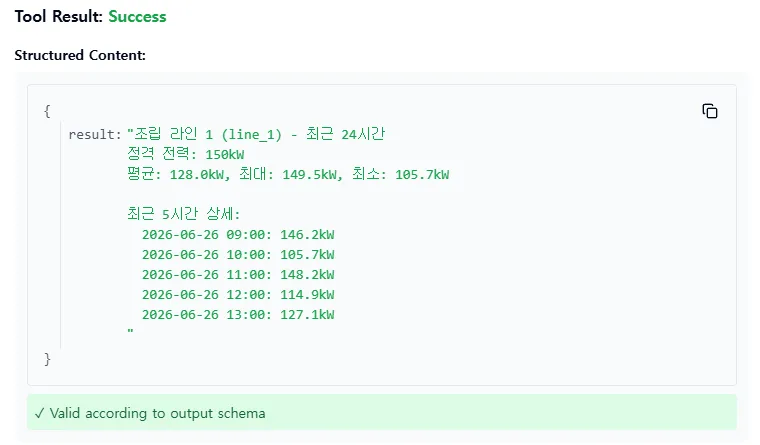
The results come out fine. It’s fake data for now, but once connected to a real DB, this could support:
- Checking power efficiency / finding areas for improvement
- Identifying where alarms occur + analyzing causes
- Monitoring operating status per line
If you naturally layer an LLM on top of this, it becomes a “factory operations assistant.”
Retrospective — MCP as a “Detached Tool”
Summary of today’s learning:
MCP = separating the tools from Tool Use into a dedicated server + wrapping it all in a standard protocol.
The flow, as I experienced it:
- Define tools on the server using the
@mcp.tool()decorator - Connect with MCP Inspector to check exposed tools + call them directly
- In the next stage, when the LLM hits a node that needs to use a tool, it calls the MCP server → bringing the result back into the LLM’s context. That’s the full picture.
What to Study Next
1. Claude Desktop Integration
- The
claude_desktop_config.jsonconfiguration format - Registering a local server + the flow where Claude automatically recognizes the tools
- Call logging / debugging patterns
2. HTTP/SSE Communication
- Operating a remote MCP server — auth / TLS / rate limiting
- Trade-offs versus stdio (latency / operational cost / security)
- Serving multiple LLM clients simultaneously from a single server
3. Resources / Prompts
- Resources — the pattern of exposing a file system / DB records as URIs
- Prompts — reusable prompt templates (variable substitution + context injection)
- Design differences between using only Tools vs using all three
4. MCP Server Security
- Combining this with the risky-tool approval pattern covered in Human-in-the-Loop
- Defining permissions / scope at the MCP server level
- Gating policies for when MCP exposes a risky tool like
delete_user
5. Public MCP Server Catalogs
- Lists of official Anthropic and community MCP servers
- Integration servers for GitHub / Slack / filesystem / Notion / Linear, etc.
- Trade-offs between building your own vs using a public server
6. Integrating MCP with LangGraph / Agent Frameworks
- Connecting an MCP client to LangGraph’s ToolNode
- Using multiple MCP servers simultaneously within a single agent
- Routing tool calls (figuring out which server has which tool)