
This is the session I said I’d cover at the end of my previous post: “I’ll try Tool Use next time.” After actually trying it out, it turned out to be more than a simple “function calling feature” — it’s a mechanism that patches the LLM’s fundamental limitations by connecting it to the outside world.
Table of contents
Open Table of contents
Two weaknesses of LLMs
This exercise made two LLM limitations clear again:
- Accurate calculation of large numbers — the model can mimic multiplication like “847 × 2391”, but the larger the numbers get, the higher the chance of hallucination. Since the model generates answers token by token, guaranteeing accuracy is structurally difficult.
- Real-time data — the model doesn’t know today’s date, today’s stock prices, or the current weather. It only knows a snapshot from its training time, so it has no idea about facts after that.
This isn’t something you fix simply by “building a bigger model.” An LLM can’t contain everything within itself, and it shouldn’t have to. That’s where Tool Use comes in.
How Tool Use solves this
You tell the model, “here are the functions you can call,” and when the model expresses an intent to call one, we actually run that function and send the result back to the model.
The key point is the model doesn’t execute the function itself. The model only expresses an intent like “please call this function with these arguments” — the actual execution happens on the client side (my code). The responsibility for safety, control, and validation stays with us.
First experiment — the calculator tool
Assuming the LLM can’t do arithmetic, I built a calculator(operation, a, b) function and registered it as a tool. Then I asked: “What is 847 × 2391?”
Analyzing the response blocks
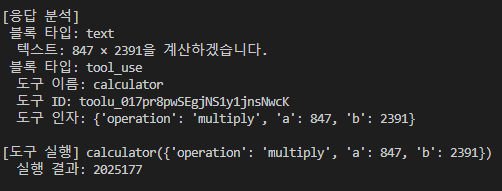
The response came back as two blocks.
블록 1 — type: text
   내용: "847 × 2391을 계산하겠습니다."

블록 2 — type: tool_use
   도구 이름: calculator
   도구 ID:   (이 호출을 식별하는 ID)
   도구 인자: {"operation": "multiply", "a": 847, "b": 2391}
When my code actually ran calculator with those arguments, it returned 2025177.
What’s interesting is that even though the model could try to do the multiplication on its own, once a tool is registered, it prefers to use it. This is intentional behavior, and it means just registering a tool can raise the reliability of the model’s answers.
Message flow — the most important diagram
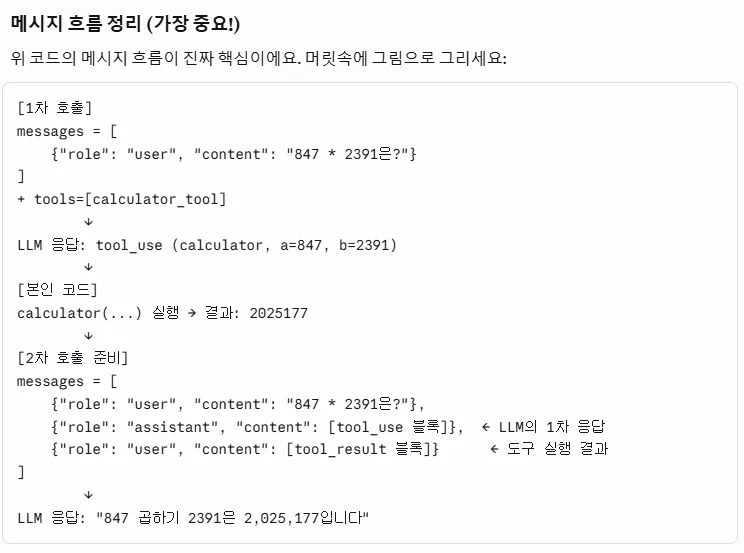
Tool Use is essentially a 2-turn conversation.
[1차 호출]
messages = [
  {"role": "user", "content": "847 * 2391은?"}
]
+ tools = [calculator_tool]
   ↓
LLM 응답: tool_use 블록 (calculator, a=847, b=2391)

[본인 코드]
calculator(...) 실행 → 결과: 2025177

[2차 호출]
messages = [
  {"role": "user",      "content": "847 * 2391은?"},
  {"role": "assistant", "content": [tool_use 블록]},     ← LLM의 1차 응답
  {"role": "user",      "content": [tool_result 블록]}   ← 도구 실행 결과
]
   ↓
LLM 응답: "847 곱하기 2391은 2,025,177입니다"
Key points.
- The first response returns the intent to call a tool.
- I execute the tool myself.
- I package the execution result into a
tool_resultblock and send it back as ausermessage. (Since the source of the tool’s result is external, not the model, it goes on theuserside.) - Then the LLM takes that result and produces the final answer in natural language.
This structure follows exactly the same pattern as “the API is stateless, the client accumulates and resends context” from my multi-turn post. The model doesn’t remember → the caller has to put everything back into the message array and resend it.
Second experiment — the weather tool
Using the same approach, I built a get_weather(city) function and registered it as a tool. In the example, I had it respond with dummy data, but in practice, if you plug an actual weather API call into that spot, the LLM can answer with real-time weather.
In other words, even though the LLM only has knowledge from its training time, it can be connected to the real-time outside world through tools. This was the core of my first impression of Tool Use.
The most fascinating part — multiple tools + the agent loop
I registered three tools (calculator, get_weather, get_time) at once and let the user ask freely.
User: “Tell me the current weather in Busan, and if it’s in Celsius, convert it to Fahrenheit.”
The model automatically chose the right tools in the right order and called them.
- First it called
get_weather(city="Busan")→ got the result - Looking at the Celsius value in the result → it called
calculator(...)to convert it to Fahrenheit - It combined both results to generate a natural-language response
What made this possible was the agent loop.
while True:
    response = client.messages.create(
        model=..., messages=messages, tools=tools
    )
    if response.stop_reason == "tool_use":
        # tool_use 블록을 꺼내서 실제 함수 실행
        for block in response.content:
            if block.type == "tool_use":
                result = execute(block.name, block.input)
                # messages에 assistant tool_use + user tool_result 추가
                ...
        continue   # 다시 모델에게 보내서 다음 행동 받기
    else:
        # stop_reason == "end_turn" 이면 종료
        break
If stop_reason is "tool_use", it means there’s another tool to use; if it’s "end_turn", the natural-language answer is complete. The loop can run tools anywhere from zero to N times.
What shocked me was that the LLM figures out on its own which tools it needs and picks them automatically. I never gave an instruction like “use the weather tool first for this kind of question, then the calculator” — it just does it on its own. This was the moment I first really felt the full weight of the word agent.
Summary
- Tool Use patches the LLM’s limitations (large-number calculation, real-time data) with external functions.
- The model doesn’t execute functions directly — it only expresses the intent to call one; the client handles actual execution.
- Message flow: first call → tool_use response → function execution → add
tool_resultas a user message → second call → natural-language response. - When you register multiple tools, the LLM figures out on its own which ones it needs and calls them. This is the agent loop.
Things to study further
1. Tool definition schema
- The JSON schema format passed into the
toolsparameter — the roles ofname,description, andinput_schema - Why writing a good description matters (it’s the basis the LLM uses to choose a tool)
- Handling required fields, enums, and nested objects in
input_schema - Reference: Anthropic’s official Tool use documentation
2. Streaming with Tool Use (briefly touched on in a previous post)
- The pattern for safely accumulating the
input_json_deltachunks I saw in my previous streaming post into complete JSON arguments - Event handling when multiple tools are called simultaneously in one response (parallel tool use)
3. Safeguards for the agent loop
- Preventing infinite loops (max iterations)
- Execution time limits for tools / fallback when an external API fails
- What form of error to return to the LLM when it’s called with invalid tool arguments, so the next attempt is smarter
- Managing context when tool results are too long (summarize? truncate?)
4. Measuring tool selection accuracy
- Whether the LLM picks the same tool every time when asked the same question 100 times
- How much the selection result shifts when the tool description changes only slightly
- How accuracy changes as the number of tools grows (5 → 20)
5. Tool Use vs. Function Calling vs. the Plan & Execute pattern
- Comparison with Function Calling from other LLM providers (like OpenAI)
- The bigger picture: how Tool Use relates to agent patterns like ReAct, Plan-and-Solve, and the OpenAI Assistants API
- Reference: Anthropic’s Building effective agents
6. Things to build myself
- Connect the weather tool to a real API (like OpenWeather) for real-time weather answers
- Build a tool that queries my Supabase DB, so it can answer natural-language questions like “how many users signed up yesterday?”
- Cache tool execution results so the same question doesn’t trigger a repeated call
Retrospective
After working with Tool Use, I finally felt the real weight of the word agent. Until now it was a vague sense of “AI does something automatically” — but seeing the LLM actually pick and use tools I’d registered made the division of labor clear: “LLM = decision maker, external tools = execution capability.”
I can already see a place for this in the solo app I’m working on. If I wrap Supabase DB queries and external API calls into Tool Use, and put a natural-language interface on top, it stops being a simple chatbot and becomes a real agent that turns user intent into action. My next study session should go in the direction of actually building this out myself.