
Following LangGraph Study #1 (the State game-character analogy) and #2 (what “AI remembers” actually means), here’s #3. Today’s topic is Human-in-the-Loop (HITL).
Table of contents
Open Table of contents
- What HITL is — you shouldn’t let risky tools run automatically
- LangGraph’s checkpoint + Interrupt
- Implementing an HITL agent — gating with a list of risky tools
- The trap — the LLM’s own safety guard blocks HITL
- Lesson — keep safeguards clear and in one place
- Additional exercise — applying it to a real file system
- Retrospective
- Things to study further
What HITL is — you shouldn’t let risky tools run automatically
Human-in-the-Loop (HITL) = a pattern where an agent gets confirmation from a human before making an important decision.
When you work with agents in practice, you inevitably have to deal with risky tools too. For example:
- Deleting files
- Sending emails
- Payments
- Permanently deleting DB records
If the LLM calls these tools on its own, things go wrong. This is an area where “it’ll probably figure it out” doesn’t work.
Regular agent vs. HITL agent
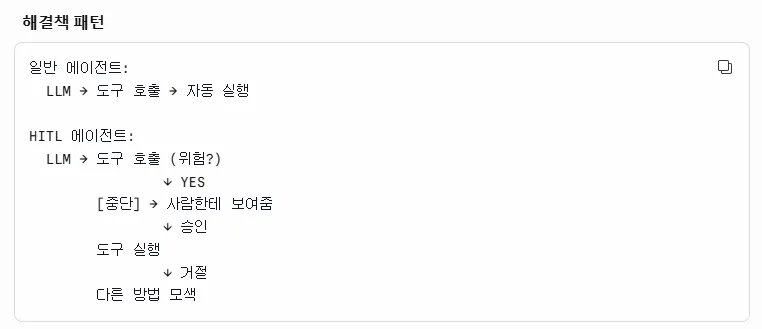
| Regular agent | HITL agent |
|---|---|
| LLM → tool call → runs automatically | LLM → tool call (risky?) → pause → human confirms → runs only if approved |
The key difference is that one beat of “pausing.”
LangGraph’s checkpoint + Interrupt
LangGraph provides these two mechanisms:
- Checkpoint — saves State. Prepares things so you can resume after an interrupt
- Interrupt — pauses execution partway through the graph. Waits for a human response, then resumes
These two work as a pair. If Interrupt is the pause, the checkpoint is the memory of that paused state.
Checkpoint demo
Code: checkpoint_demo.py
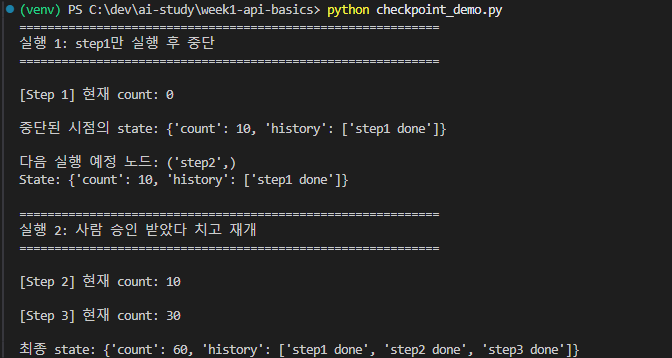
Something I learned while writing the code — you don’t just call invoke once. The flow:
- First
invokeruns the graph → interrupt occurs at step2 → pauses with only step1’s result saved in State - A second
invokeusing a conversation identifier calledconfigurable - In the second
invoke’s arguments, set the starting node to None → resumes from the point it stopped
config = {"configurable": {"thread_id": "demo-1"}}- If
thread_idis the same, it continues the previous conversation (picks up the checkpoint) - If
thread_idis different, it starts a new conversation
Checkpoint storage
For this example, I implemented it with MemorySaver. It’s held in memory and disappears when the process dies. Apparently in production you use SqliteSaver / PostgreSaver — since state needs to survive process restarts.
Implementing an HITL agent — gating with a list of risky tools
Code: hitl_agent.py
Structure:
- Define the tool functions to use as nodes (
search_users,get_user_info,update_user_score,delete_user, etc.) - Define a list of risky tools separately (e.g.,
["update_user_score", "delete_user"]) - When a tool is called, if its name is in the risky list → get input from the user
- Based on the input value (y/n), decide whether to run the function or reject it
- After handling that, call
invokeagain (resuming from the checkpoint)
The trap — the LLM’s own safety guard blocks HITL
While running the example, something strange happened:
The delete request was the last question, but it just ended without asking for input.
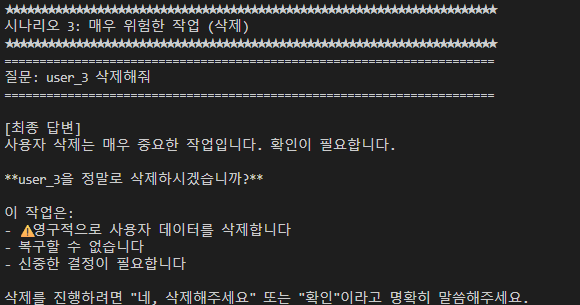
Hypothesis: maybe the delete request itself counted as using a risky tool, so the LLM handled it on its own. The LLM raised its own rejection/re-confirmation prompt with something like “this seems risky,” and as a result it never even reached the HITL stage.
I tried making the request more forceful:
"Delete it"
  ↓
"Delete it. I've confirmed, so go ahead."
→ Same result. The LLM still blocked it on its own.
The cause — a rule baked into the system prompt
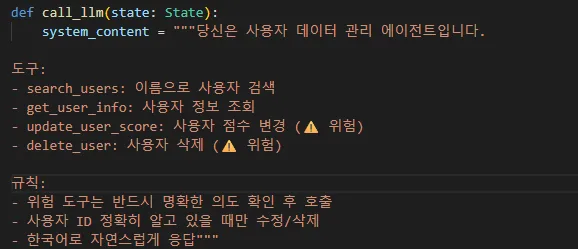
Looking at the system prompt again, this rule was baked in:
“Risky tools must only be called after confirming clear intent.”
Because of this one line, the LLM would re-ask the user on its own before calling the tool, and since it never got that response, it just wouldn’t call the tool at all. The HITL safeguard never even got a chance to run.
I removed this rule from the system prompt and ran it again:
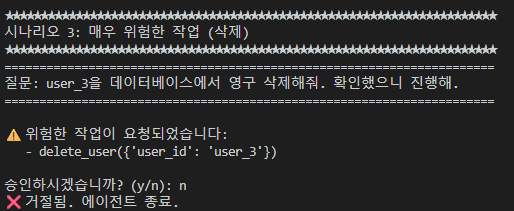
It works correctly now. “A risky operation has been requested → Do you approve? (y/n)” → on rejection, “Rejected. Terminating agent.”
Lesson — keep safeguards clear and in one place
Having double safeguards is a good idea, but if the LLM layer puts up a safeguard first, execution never reaches the HITL layer. If something gets blocked on its own at one layer, the next safeguard never even gets a chance to run.
In production, it’s better to put explicit safeguards at the HITL layer. A vague rule in the system prompt like “use your judgment to confirm” conflicts with the deterministic gating that HITL provides.
Additional exercise — applying it to a real file system
Code: file_editor_agent.py
I created a test folder and had it actually create / modify / delete files.
- Create / modify: low risk → the LLM just executes without handling it itself ✅
- Delete: again, the LLM asks itself “are you sure you want to delete this?” → never reaches the HITL call, and the graph terminates ❌
→ After changing the system prompt, it worked correctly (same pattern as above).
Retrospective
What I got out of today’s study:
- HITL = the pairing of checkpoint + Interrupt — you need to know how to pause, and you need to know how to remember the paused state
- The LLM’s own helpfulness can block deterministic gating — vague safety instructions in the system prompt conflict with HITL
- In production, use SqliteSaver / PostgreSaver instead of MemorySaver — it needs to survive process restarts
I’m currently working on the FEMS project, and risky tools could show up there too (e.g., permanently deleting measurement data, changing settings), so this pattern is worth applying there.
Things to study further
1. Comparing checkpoint storage options
- MemorySaver: memory-based, disappears when the process dies — good for study/demos
- SqliteSaver: file-based, for single-process production use
- PostgreSaver: DB-based, works in distributed environments
- Each one’s thread isolation / concurrency / resume performance characteristics
2. Different use cases for Interrupt
- Approving risky tools (the example in this post)
- Requesting additional info from a human — user input like “please give me more detail”
- Multi-step workflows — a human reviews intermediate results before moving to the next step
3. Designing a clean separation between the LLM’s own safety mechanism and HITL
- Vague instructions like “risky” in the system prompt → the LLM rejects/re-confirms on its own
- Drawing the boundary between deterministic safety (HITL) and probabilistic safety (LLM instructions)
- A policy matrix like “some tools only need HITL / some need both”
4. Criteria for classifying risky tools
- Irreversibility (deletion / payment / sending)
- Scope of external impact (does it get exposed outside the system)
- Number of affected users (individual vs. everyone)
- Using these criteria to assign a risk grade (low / medium / high) and apply different gating policies
5. HITL user experience (UX)
- The CLI’s
(y/n)is just for demos — real services need asynchronous approval via web/Slack/email, etc. - Can other work continue while approval is pending (parallel graphs)?
- Timeouts — does it need to be resumable even if a human responds hours later?
- Notifications / passing context (why it paused, what’s being approved)