
Continuing from Eval Study #2 (similarity and test set design). Up until now I’ve been doing Eval on RAG. Today it’s Eval on agents.
Table of contents
Open Table of contents
RAG Eval vs Agent Eval — the number of judging axes jumps sharply
RAG Eval was simple — question → is the correct chunk in the top-k of the retrieval results? One axis.
Agents have at least 6 judging axes:
- Tool selection — did it pick the right tool?
- Argument extraction — were the arguments passed to the tool correct?
- Multi-step trajectory — did it call multiple tools in the correct order?
- Termination judgment — did it know when to stop?
- Safety guards — did it stop on dangerous operations?
- Final answer quality — did it synthesize the tool results well?
With more axes, it’s common for one axis to fail while the others succeed. → To pinpoint the cause, you need to look at the axes separately. Same principle as doing unit tests before integration tests.
Today’s focus is three axes: tool selection + multi-step + trap regression. I used the MCP agent and HITL agent I built previously as targets.
Eval code structure
1) Feeding in MCP server tool metadata
First, I feed the eval code the tool information the target agent can use:
- name
- description
- input schema
The idea is to feed the eval the exact same raw material the agent uses as grounds for deciding “which tool should I pick.”
2) Test set
Each case is labeled with (question, expected tool, expected args, level):
{
  "question": "포장 라인 전력 사용량 알려줘",
  "expected_tool": "get_energy_consumption",
  "expected_args": {"line_id": "packaging"},
  "level": "easy",
}
3) Run → quantify
I feed the test set’s questions into the agent, then compare predicted tool/args vs expected tool/args. Results come out as accuracy.
Single-step eval — tool selection accuracy 84.6%

- Tool selection 11/13 = 84.6%
- easy 6/7, hard 5/6 — checked separately by level
- Argument extraction 3/3 = 100% (only for cases where the tool was correctly chosen)
The 2 failure cases were interesting learning points.
Failure case 1 — the limits of single-step scoring
In one case, “the phrasing of the question was different, so the LLM couldn’t find the expected tool.” But looking at the actual trajectory, this tool was being called in the correct order within a multi-step flow that invoked multiple tools.
- Single-step eval: scored as “this question → this one tool” → failure
- Actual: correct within the multi-step trajectory
In other words, single-step scoring falsely flags correct multi-step trajectories as failures. To properly check this case, you need to move to multi-step eval.
Failure case 2 — the tool description was ambiguous
Another case: asking “how much is the electricity bill?” picked the consumption tool instead of the cost tool.
But asking the same thing in different phrasing gave different results:
- “How much is the electricity bill?” → wrongly picked consumption ❌
- “How much money is it?” → correctly picked cost ✓
Root cause: the direct word “money” triggered the cost tool. “Electricity bill” was ambiguous and leaked toward consumption. In other words, the tool description didn’t sufficiently cover the vocabulary of the billing/cost domain.
Even after fixing the description, it still failed. Eventually, adding a hint to the system prompt like “for ‘electricity bill,’ prioritize checking cost-family tools” made it pass.
An important intuition here:
If you modify the system prompt just to make an eval pass, that itself is overfitting. Experimenting to understand the cause is fine, but you shouldn’t ship this as the fix.
Multi-step eval — scoring the trajectory
Multi-step eval has multiple scoring points, making it much harder than single-step:
- Did it call all the necessary tools?
- Did it call them in the required order?
- Did it actually use the results of a prior tool in the next step?
- Did it terminate appropriately without falling into an infinite loop?
For the test set too, I labeled each case with “the list of required tools + whether order is required.”
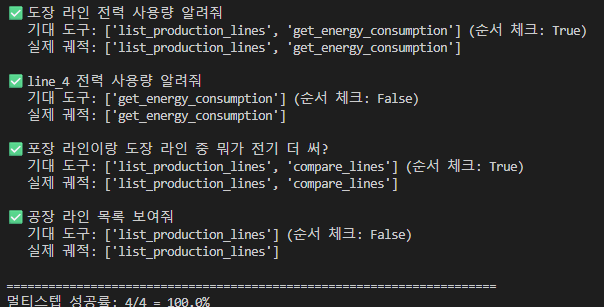
Result: 4/4 = 100%.
- “Tell me the painting line’s power usage” —
list_production_lines→get_energy_consumption(order required: yes, correct) - “Tell me line_4’s power usage” —
get_energy_consumptionalone (order required: no, correct) - “Which uses more electricity, the packaging line or the painting line?” —
list_production_lines→compare_lines(order required: yes, correct) - “Show me the list of factory lines” —
list_production_linesalone
The case marked as a failure under single-step eval passed under multi-step. Because the trajectory was correct as intended. It makes sense in theory, but seeing it confirmed with actual numbers was still interesting.
Retrospective
Three intuitions gained from agent Eval:
- Separate the scoring axes — if you lump tool selection/arguments/order together, you can’t tell “where it went wrong.” Splitting by axis speeds up root cause identification. Unit tests before integration tests.
- Single-step scoring falsely flags correct multi-step trajectories — it can’t catch cases that are correct within a trajectory. If the agent is designed for multi-step operation, you must extend to multi-step eval.
- Modifying prompts/descriptions just to make eval pass is overfitting — use it only to understand the cause of failure. Keep patching prompts to pass, and you end up with an agent that only does well on the eval set.
Remaining homework
Today I only evaluated multi-step with 4 cases. Directions for expansion:
- Add trap cases — check whether the agent avoids calling a tool when it shouldn’t
- Measure step count — calling two steps when one would suffice hurts efficiency. Adding step count as a metric would let me detect this
- Termination judgment, safety guards, final answer quality — the remaining 3 axes not covered today
Dev environment note — Windows encoding issues
While developing the eval, I got stuck a few times on Windows encoding issues. Since I’m near the end of my LLM studies, I pushed through as-is, but for my backend studies I’ve moved to WSL2. Overhauling the dev environment is a matter of timing.
Further study
1. Agent Eval frameworks
- LangSmith — trajectory tracing + eval for LangChain/LangGraph-family agents
- Ragas’s agent eval extensions
- OpenAI Evals — tool-use benchmark cases
- Comparing how frameworks split up scoring axes
2. Trace-level Eval — scoring the trajectory itself
- Parsing the tool call tree and feeding it into scoring logic
- How to automatically verify whether prior results are referenced in later steps’ arguments (data flow)
3. Designing trap tests
- How to construct “questions that shouldn’t trigger a tool call”
- Designing dangerous cases that require safety guards (file deletion, payments, external API calls)
- How to quantify the error rate
4. Optimizing tool descriptions
- Principles for writing descriptions that help LLMs pick tools well
- Reference: Anthropic’s tool use guide
- Pipelines for automatically improving descriptions — DSPy-family approaches
5. Cleaning up the Windows dev environment
- Criteria for deciding when to fully migrate to WSL2
- Summarizing the pitfalls of Windows local vs WSL2 vs Docker