
Following Spring Boot #1 (first run · DI), #2 is CRUD with REST API. Today’s goal was to build create/read/update/delete for a simple resource called todos, and split the logic that had piled up in the controller out into a service.
Table of contents
Open Table of contents
- What exactly is a REST API — sorting it out again
- Starting CRUD in the controller
- Sorting out curl options
- Completing CRUD with PUT · DELETE
- The controller was doing all the logic too — splitting out a service
- Layered Architecture — Controller / Service / Repository
- Why put update requests in a separate file
- Exception handling — custom exception + global exception handler
- Trial and error — folded back into study guidelines
- Retrospective
- Things to study further
What exactly is a REST API — sorting it out again
I knew CRUD meant “create/read/update/delete,” and I knew REST API had “something to do with URLs” — that’s about it. The precise definition is this:
REST API = a combination of URL (address) + HTTP method.
Role of each HTTP method:
| Method | Role | Spring annotation |
|---|---|---|
| GET | Read | @GetMapping |
| POST | Create (add) | @PostMapping |
| PUT | Update (change) | @PutMapping |
| DELETE | Delete | @DeleteMapping |
Even the same URL /todos behaves differently depending on the method. “What, where, how” is expressed as the product of URL and method.
Starting CRUD in the controller
First I built a storage (an in-memory List), then had the controller handle listing all · fetching one · creating:
@RestController
@RequestMapping("/todos")
public class TodoController {

    private final List<Todo> store = new ArrayList<>();
    private final AtomicLong seq = new AtomicLong();

    @GetMapping
    public List<Todo> all() { return store; }

    @GetMapping("/{id}")
    public Todo one(@PathVariable Long id) { /* ... */ }

    @PostMapping
    public Todo create(@RequestBody TodoCreateRequest req) {
        Todo t = new Todo(seq.incrementAndGet(), req.title(), false);
        store.add(t);
        return t;
    }
}@RequestBody— automatically converts JSON from a POST request into a Java object. Jackson handles this behind the scenes.
Sorting out curl options
In the examples, I mostly sent requests with curl:
-X— specify the HTTP method (-X POST,-X PUT,-X DELETE)-H— specify a header (-H "Content-Type: application/json")-d— the body data (-d '{"title": "study"}')
Naturally, the data after -d has to match the format declared in the -H Content-Type. If you declare JSON in the header but send XML, the server throws a 400.
Completing CRUD with PUT · DELETE
I added update/delete to the controller as well:
@PutMapping("/{id}")
public Todo update(@PathVariable Long id, @RequestBody TodoUpdateRequest req) { /* ... */ }

@DeleteMapping("/{id}")
public void delete(@PathVariable Long id) { /* ... */ }
Verifying the flow with 5 curl steps
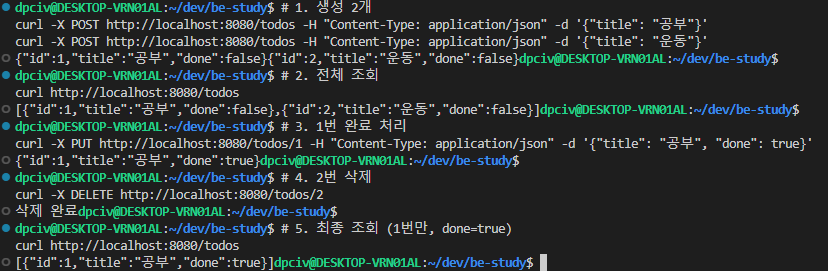
5-step CRUD — create 2 items → list all → update item 1 (done=true) → delete item 2 → final check. Each step’s response lined up as expected, confirming the CRUD flow works end to end.
Debugging a 400 error
At one point I hit a 400 — I checked the cause immediately from the stack trace in the server-side console. In backend debugging, this console is basically the map. If you’re only looking at the frontend, there’s no way to tell why a 400 happened.
The controller was doing all the logic too — splitting out a service
Up to this point, the storage, logic, and response were all mixed together inside the controller. The controller’s original responsibility is just “receive request, send response,” but it was also holding business logic (issuing ids, todo update rules). This needed to be split.
Layered Architecture — Controller / Service / Repository
I moved the logic into a service and pulled the storage out into a repository. This is called Layered Architecture:
| Layer | Responsibility |
|---|---|
| Controller | Request · response (HTTP boundary) |
| Service | Business logic |
| Repository | Storage/retrieval (data boundary) |
Splitting into these 3 layers gives:
- Each layer has a single responsibility — it’s clear where you need to fix something
- Testing gets easier — if you only want to unit test the Service, you can mock-inject the Repository using the DI I learned in #1
- The blast radius of changes narrows — when switching the DB from in-memory to a real DB, you only touch the Repository
Why put update requests in a separate file
There’s a convention of keeping the request body container in its own file, like record TodoCreateRequest(String title) {}. It’s not required, so why do it?
- The filename reveals the role — seeing
TodoUpdateRequest.javatells you instantly “this is the update request schema” - The controller/service files stay thin — if the record definition gets inserted in the middle, it pushes down the actual logic
- Easier to reuse/version — if the schema diverges for API v2, you can duplicate/branch the whole file
Exception handling — custom exception + global exception handler
Previously, querying a non-existent id returned an empty response. From the user’s perspective, there’s no way to know “why isn’t this working.” I made a custom exception so it responds with 404 Not Found:
public class TodoNotFoundException extends RuntimeException { ... }Catching this in every controller method and mapping the response code each time? That’s tedious. With a Global Exception Handler, everything is handled in one place:
@RestControllerAdvice
public class GlobalExceptionHandler {

    @ExceptionHandler(TodoNotFoundException.class)
    @ResponseStatus(HttpStatus.NOT_FOUND)
    public ErrorResponse handle(TodoNotFoundException e) {
        return new ErrorResponse(e.getMessage());
    }
}
Now:
- The controller just throws
- How to map it to a response is the handler’s job
The contract I learned in Java #3 — “throw forces propagation up the call stack” — turns out, in Spring, to be automated as the controller → global handler flow. Something I learned as Java syntax gets stacked on top in practice through the framework.
Trial and error — folded back into study guidelines
I stumbled twice while doing this today:
- Trying to start the server without the referenced class present — the study example instructions kept pushing me to run the server first, which failed to compile
- Writing code that uses a library before adding the library — same issue, compilation failure
Both were cases of not following the “code → dependency → run” order. I added “before writing code, first check that all necessary classes/dependencies are in place” to the study example guidelines (the prompt I give the AI) to prevent this from happening again.
The same trap shows up in real work — if you try to run code while references are broken mid-refactor, you lose time to compilation failures like this.
Retrospective
Three things I picked up on in this post:
- REST API is a combination of URL and HTTP method — once the definition was clear, actually writing CRUD went fast. I’d been putting it off simply because I didn’t know the definition.
- Layered architecture is a natural extension of the interface/DI sense from #1 — the Controller only needs to know the Service interface, and the Service only needs to know the Repository interface. Each layer not knowing the implementation of the next layer is the root of testability and ease of modification.
- The global exception handler is a practical application of Java #3’s “throw forces propagation” — the controller just throws, and something above handles it. Something I learned in Java #3 clicks into place here, showing why it was needed.
Things to study further
1. DTO file separation convention
- How to split Request DTO · Response DTO · Domain model into 3 layers
- How to manage schema evolution (v1 → v2)
- Reference: Baeldung — DTO Pattern
2. HTTP status code standards
- 2xx (200 OK · 201 Created · 204 No Content) — when to use each
- 4xx (400 Bad Request · 401 · 403 · 404 · 409 Conflict) — when to use each
- 5xx (500 Internal · 502 · 503) — distinguishing server-side causes
- Following the standard well makes it easier for the frontend to automate error UX
3. @Valid + Bean Validation
- Validating request body fields (
@NotNull,@Size(min=1),@Email, etc.) - Automatic 400 response on validation failure
- How to route Bean Validation failures through the global exception handler
4. Various implementations of the Repository layer
- Today it was in-memory (a List) — gone on process restart
- JPA / Hibernate — the standard Java ORM
- Spring Data JPA — just define the interface and CRUD methods are generated automatically
5. DB · SQL basics — the next axis of study
- Relational DB concepts · normalization
- Starting with PostgreSQL
- Building a feel for SQL itself before moving on to JPA